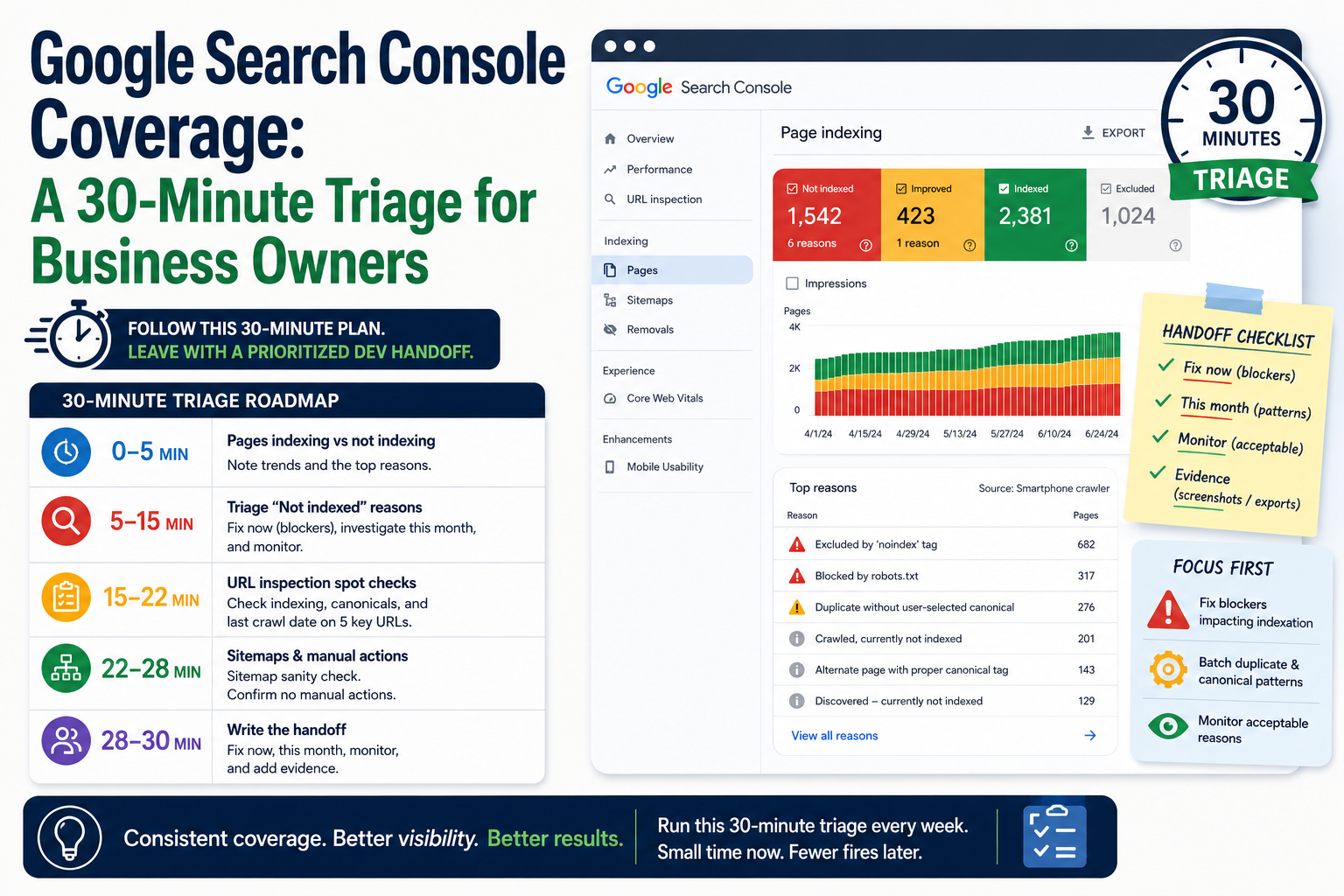
Search Console opened to a wall of red and yellow. "Excluded by noindex." "Crawled, currently not indexed." "Duplicate without user-selected canonical." Your developer says some are normal. Marketing wants everything green by Friday.
Coverage reports are useful when you know which buckets matter this week and which can wait. This is not the same problem as "we launched yesterday and we are not on page one." That is timing and authority. Coverage is whether Google can process your URLs the way you intend.
We run technical SEO and Search Console triage with owners who need a short routine, not a certification course. Block thirty minutes, follow the order below, and leave with a prioritized list for your dev or agency.
Before You Start: Confirm the Basics
- You are in the correct Search Console property (HTTPS, www or non-www matches your canonical choice)
- Your sitemap is submitted and refreshed after recent launches
- You know whether staging is accidentally verified (remove or disallow staging from production workflows)
If those are wrong, fix property and sitemap first. Everything else will mislead you.
Minute 0–5: Pages Indexing vs Not Indexing
Open Pages (formerly Page indexing). Note:
- Indexed count trend (up, flat, down after a redesign?)
- Largest Not indexed reason by count
Write down the top two reasons only. You will not fix twelve categories in one sitting.
Minute 5–15: Triage "Not Indexed" Reasons
Fix now (blockers)
|
Reason
|
What it usually means
|
Owner
|
|
Excluded by noindex on money pages
|
Staging tag or template left live
|
Dev / CMS
|
|
Blocked by robots.txt on public paths
|
Launch file or plugin rule
|
Dev
|
|
Server error (5xx)
|
Hosting or deploy issue
|
Dev / hosting
|
|
Redirect error
|
Broken chains after URL changes
|
Dev
|
Spot-check three URLs in each blocker category with URL Inspection. Confirm live HTML matches what Search Console reports.
Investigate this month (foundations)
|
Reason
|
What it usually means
|
|
Duplicate without user-selected canonical
|
Multiple URLs with same content; missing or wrong canonical
|
|
Alternate page with proper canonical
|
Often acceptable if canonical points to the preferred URL
|
|
Crawled, currently not indexed
|
Google saw the page but chose not to index (quality, duplication, or low priority)
|
For duplicates, export sample URLs. Group by pattern (/blog?page=2, trailing slashes, HTTP vs HTTPS). Fix templates, not one URL at a time forever.
For "crawled, not indexed," prioritize service and product URLs over old campaign landers. Improve uniqueness, internal links, and on-page clarity before demanding indexation.
Often acceptable (monitor)
|
Reason
|
Notes
|
|
Excluded by canonical (when canonical is intentional)
|
Parameter URLs pointing to clean URL
|
|
Discovered, currently not indexed
|
New site or new pages; wait and improve internal linking
|
|
Soft 404 on retired content
|
Confirm intentional; use 410 or redirect if not
|
Minute 15–22: URL Inspection Spot Checks
Pick five URLs:
- Homepage
- Top service or product page
- Contact or lead page
- One blog or news post
- One URL from your largest "Not indexed" bucket
For each, read:
- Indexing allowed?
- User-declared canonical vs Google-selected canonical
- Last crawl date (stale after redesign?)
If Google-selected canonical differs from yours, that is a conversation with dev, not a content tweak alone.
Minute 22–28: Sitemaps and Manual Actions
Sitemaps: status success? Count roughly matches important public URLs? Remove junk (staging paths, internal search, thank-you pages you noindex).
Manual actions / Security issues: should be none. If present, stop and fix policy or hack recovery before cosmetic SEO.
Minute 28–30: Write the Handoff
Send your team one message with:
- Fix now: list with example URLs
- This month: patterns (canonicals, thin pages, internal links)
- Monitor: reasons you accept for now
- Evidence: screenshots or exported samples, not "Search Console looks bad"
That handoff prevents the weekly ping-pong of "is this urgent?"
After a Redesign: Coverage Gets Noisy
Expect temporary swings when URLs change. Pair Search Console with:
- Redirect map verification (old → new, single hop)
- Canonical tags on new templates
- Updated sitemap submitted same week as go-live
If indexed count drops sharply four weeks after launch, treat it as website redesign and migration SEO work, not patience alone.
What This Routine Does Not Cover
- Keyword rankings and content strategy
- Core Web Vitals deep dives (separate report)
- Backlink analysis
Coverage triage answers: Are the right URLs indexable, and does Google agree with our canonical story?
Practical Takeaway
Once a week, thirty minutes: top not-indexed reasons, spot checks, sitemap sanity, one prioritized dev list. Fix blockers first. Batch duplicate and canonical patterns second. Do not chase every excluded tag URL if it is intentionally noindexed.
What coverage reason showed up most often the first time you opened Search Console after launch?