SEO
Google Search Console
SEO Audit

# Why Your New Website Isn't Showing Up on Google (Yet)
You launched the site. It looks good. You typed your business name into Google and... nothing. Or maybe only the homepage shows up, and the service pages you spent weeks on are invisible.
That moment is frustrating, but it is more common than most teams expect. A new website not showing up in search does not always mean SEO is "broken." Often it means Google has not finished discovering, processing, and trusting your pages yet.
Some fixes are quick. Others take patience. The goal of this guide is to help you tell the difference without needing a full audit vocabulary on day one.
I work on technical SEO for business websites with teams launching new sites, and these are the checks I walk non-technical owners through first.
## A New Website Not Showing Up Is Often Normal (At First)
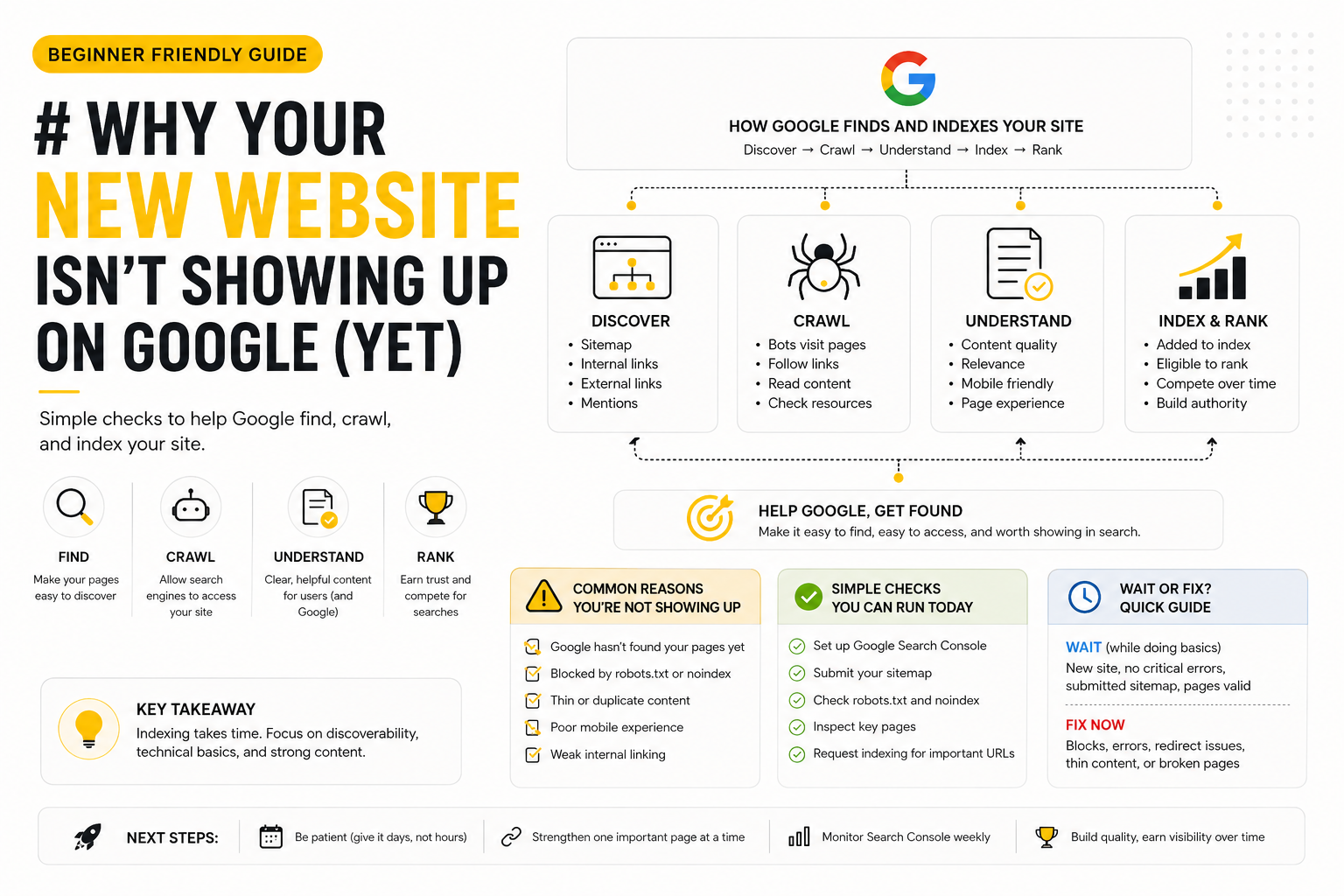
Search engines do not add every new page to results the moment you hit publish. Google needs to find your URLs, crawl them, understand what each page is about, and decide whether to show them for relevant queries.
For a brand-new domain with little history, that process can take days or weeks. For an established domain launching a redesign, indexed pages may update faster, but new URL structures still need time to settle.
That does not mean you should ignore SEO until month three. It means panic is usually premature if you launched last Tuesday and expected page-one rankings by Friday.
### How long should you wait before worrying?
There is no fixed guarantee, but these rough guides help set expectations:
- New domain, first launch: Give it one to four weeks before you expect much beyond brand-name searches. Google may index your homepage sooner than deeper pages.
- Existing domain, new pages added: Individual pages can appear within days if the site already has crawl history and internal links point to them.
- Brand search vs other searches: Searching your exact company name should work sooner than ranking for generic terms like "web design services" or "accounting firm near me." Non-brand visibility takes longer and depends on content, competition, and site authority.
If Search Console shows pages as "Discovered" or "Crawled" but not yet indexed, that is often a waiting game plus a signal to improve page quality and internal linking.
## Common Reasons Google Hasn't Listed Your Site Yet
Before you assume the worst, look for straightforward causes. Most beginner indexing problems fall into a few buckets.
### Google hasn't found your pages yet
If Google never crawls a URL, it cannot rank it.
Common situations:
- No sitemap submitted in Google Search Console
- Important pages linked only from menus JavaScript renders poorly, or not linked from anywhere at all
- The site has no external references yet (social profiles, directories, partner links)
- Deep pages sit three or four clicks from the homepage with no internal links in body content
Your homepage might get found first. Service pages hidden behind vague navigation often lag behind.
### Something is blocking search engines
Sometimes the site is live for humans but closed to Google by mistake.
Watch for:
- `robots.txt` rules that disallow all crawlers (`Disallow: /`)
- `noindex` meta tags left over from staging or a "coming soon" template
- Password-protected staging accidentally left on production
- CDN or hosting settings that return errors to bots but not to your browser
These are fix-now issues. No amount of waiting helps until the block is removed.
### Pages look empty or unclear to Google
Google needs enough signal to understand intent on each URL.
Weak patterns we see on new business sites:
- Thin content: a heading, one paragraph, and a contact button
- Duplicate boilerplate: the same generic text on every service page with only the title swapped
- Missing titles and meta descriptions: browser tab says "Home" or "Untitled"
- Multiple pages targeting the same vague topic with no clear difference
You do not need a novel on every page. You do need one clear topic per URL, a descriptive title, and copy that answers what a visitor (and Google) would expect to find there.
### The site is hard to use on mobile
Google uses mobile-first indexing for most sites. If the mobile version hides key content, loads broken layouts, or shows a desktop-only experience, that can slow how confidently Google treats your pages.
This is not a deep performance lecture. Start simple: open your site on a phone, read your main pages, and tap your contact or booking flow. If it feels broken on mobile, fix that before obsessing over keyword lists.
## Simple Checks You Can Run Today
You do not need expensive tools to make progress. Work through this list in order.
### Set up Google Search Console
Search Console is free and shows how Google sees your site.
1. Verify your domain or URL prefix at [Google Search Console](https://search.google.com/search-console).
2. Submit your sitemap (usually `/sitemap.xml` or your CMS sitemap URL).
3. Use URL Inspection on your homepage and one important inner page. Check whether Google can fetch the URL and whether indexing is allowed.
4. For key pages that are valid but not indexed, use Request Indexing sparingly on your most important URLs (homepage, top services, contact). It is a nudge, not a magic button.
Review the Pages report weekly for "Not indexed" reasons. That report tells you whether to wait, fix content, or fix a technical block.
### Confirm your sitemap and robots.txt
Sitemap: Should list the URLs you want indexed. Remove staging URLs, thank-you pages you do not need in search, and duplicate variants if your CMS creates them.
Robots.txt: Should not block your public pages. A minimal allow-all file is fine for many small business sites. If you see `Disallow: /` on production, treat that as urgent.
When in doubt, open `yoursite.com/robots.txt` in a browser and read what crawlers are told.
### Fix one page really well before adding twenty
New sites often spread thin content across many URLs. A better beginner move:
- Pick your most important commercial page (core service or product).
- Give it one clear H1, a unique title tag and meta description, and copy that explains who it is for and what happens next.
- Link to it from the homepage in body content, not only the footer.
- Check it in Search Console after a few days.
One strong page indexed and ranking for a brand-plus-service query beats twenty placeholder pages Google ignores.
## When to Wait vs When to Fix Something Now
Use this quick decision guide:
Reasonable to wait (while doing basics):
- Site launched recently on a new domain
- Search Console shows no critical errors
- URLs return 200 status and are not marked noindex
- You submitted a sitemap and requested indexing for key pages
- You are still building out content and internal links
Fix something now:
- Production site has noindex or robots blocks
- Search Console shows coverage errors, server errors, or redirect loops
- Staging URLs or password gates are still live
- Important pages return 404 or soft-404 (empty template with 200 status)
- You changed domains or URL paths without redirect planning (see a migration guide if you redesigned, not just launched new)
Waiting without monitoring is passive. Fixing without diagnosing is chaotic. Search Console plus the checks above keeps you in the middle: informed patience.
## Closing
A new website not showing up on Google yet is usually a mix of time, discoverability, and a few fixable setup gaps. Indexing is step one. Ranking for competitive terms comes later and depends on content quality, relevance, and how well your site serves real visitors.
Start with Search Console, unblock crawlers, strengthen one page at a time, and link important URLs from your homepage. Those basics prevent the silent failures that still happen on otherwise beautiful launches.
What showed up first when you checked your site: nothing, homepage only, or a confusing error in Search Console?
If you are about to go live, scoping a pre-launch SEO check early beats fixing indexation surprises after launch.